meaningful impact with tech
jan 6, 2026
preface
This project was done through the Information Systems (IS) junior/senior capstone class, 67-373. Students worked in teams of three to consult a client partnered with the IS Program, and were advised throughout the semester by a faculty member.
Coming into the semester I was definitely nervous about the team situation, the client I'd be assigned to, and also my advisor. I'd heard some horror stories about all of the above, whether that was teammates being hard to work with, clients being hard to work with, the project being very niche and boring, or having a strict advisor. Thankfully, I was lucky enough to get an amazing team, client, and advisor.
I'd like to thank my teammates Jacob and Nita, our clients Joni and Kate at Christopher's Kitchen, and our advisor Selma, for a great semester and an awesome project.
Although this isn't the most technical project that I've done, it is one of my favorites because I could see first-hand the impact I was making. Just a little bit of technical fluency really went a long way in helping them with their problem. I enjoyed the time I spent with Christopher's Kitchen, and I'm really happy that we were able to help them out in the end!
their mission
Christopher's Kitchen (CK) is a 501c3 non-profit founded in 2017 by Joni D'Alessandro after the passing of her step-son, Christopher. Through her own experiences and observations while volunteering, Joni noticed that caregivers to children often do not have easy access to food, so she set out to fix this.
The organization's mission is simple. Christopher's Kitchen provides free food for families and caregivers who remain by loved ones in the hospital or extended care facility.
The last thing families who have a child in the hospital should worry about is food. Our goal is to eliminate the need for families to leave the facility to feed themselves, as well as the financial burden of a meal.
Once our team was assigned to work with them, we were quickly bought in to the cause. The next thing we needed to do was actually help them with the problem they brought to us!
brief background
Non-profits don't usually make profit the same way normal businesses do, but they are still required to keep thorough documentation of their financial records. This can be donations, grants, revenue from events, or anything else.
In CK's case, they gain most of their revenue in the form of food or monetary donations. Monetary donations are easy to track—they can just mark down the donor, the date, the amount, etc. However, food donations can be a little trickier.
The process doesn't seem so bad at first. All you need to do is write down the amount of each type of food, find the price of each item, and calculate a total donation value from it all. Voilà! All done, right?
Unfortunately, saying the process in plain english may be simple, but with little to no technology this can become quite a tedious process. As you can imagine, CK receives a lot of food donations. So doing this process manually takes a ton of time because they need to find the exact item name, find a reasonably accurate price (by looking it up on Google), mark the name, price, and quantity, down somewhere, then once they've marked everything down, finally calculate a total valuation.
the problem
CK was using the following process to count the monetary value of their food donations:
- Print out a 4-5 page spreadsheet full of their most common donation items.
- Go through their food donation item by item, find the item on their list, and tally how many there are.
- Once finished tallying, punch the quantities into the same exact spreadsheet, but on Excel on their local desktop.
- Follow 2 pages of instructions including non-trivial Excel spreadsheet manipulations to find a total cost.
- Take that total valuation and record it.
Just from reading this process, you can see that this wasn't the most straightforward and user-friendly process. Especially not for older volunteers that are not comfortable navigating technology.
There was redundancy, annoying manual labor, and to make it worse, step 4 used hard-coded prices on only the items in the hard-coded list of items. If the prices changed, then CK's estimations would not, and if they received any food items outside of this list, they still had to manually search it up.
This is where Jacob, Nita, and I (Gabriel), aptly named the JNG Consulting Team, came in.
our approach
There were a couple different ways we thought about approaching this. The main two ideas we had were:
- Build a full-stack application that does all of this for them from scratch.
- Find tools that fit the different parts of the problem and then build a workflow that is intuitive to follow.
Although there was an itch to go all in with option 1, we decided that it was probably best to go with option 2 in our given timeframe. Once we decided this, we started brainstorming a structured workflow on what we thought would be the most straightforward way to go from a random assortment of foods, to a final price.
Since this was a product that primarily older volunteers would be using, we wanted to make sure that it would make the most sense possible. User-friendly design is the key, but you have to make sure you remember who your users are. Since we (a team of college students in the Information Systems program at CMU), were quite a different demographic than our clients (older and non-technical), we wanted to double check at every step that our intended solution would make sense.
After some more discussion with Joni and Kate, we thought hey, why don't we try to figure out some sort of way where we can just scan each item to get its name and price? They were pretty comfortable with this idea since scanning barcodes isn't new technology, so we went ahead and started figuring out how this could actually work.
We researched some more and realized that this was quite promising. Each item has a barcode on it (they only accept boxed or canned items in its original packaging), which corresponds to a Universal Product Code (UPC), which could then be used to look up that food's details.
If we could figure out some sort of way to scan an item's barcode and get its name, price, and quantity, then we could pretty easily handle the rest (tracking and aggregation) with a spreadsheet. So all we had to do was figure out how to get the scanning stuff to work, or what tools to use to replace these questions marks with.
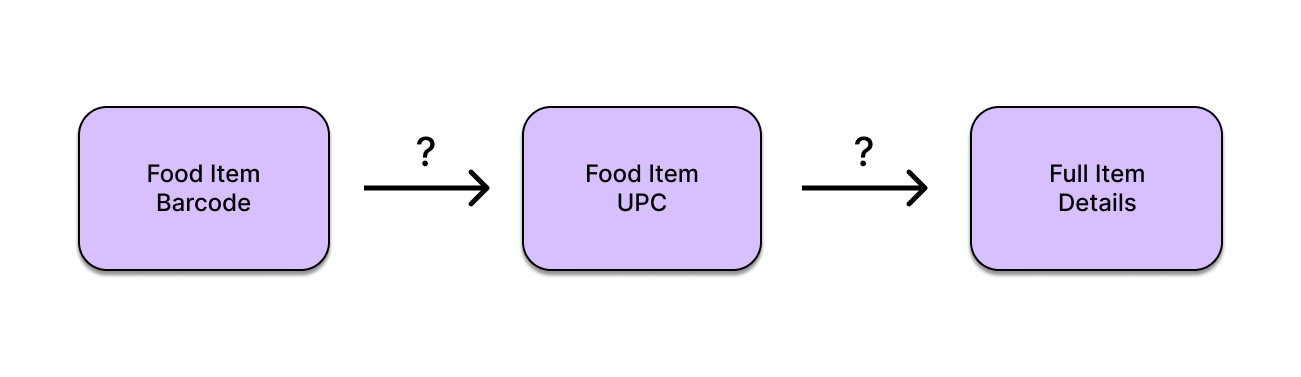
addressing the question marks
After some playing around with random tools on the internet, we ended up using OrcaScan and Upcitemdb.
OrcaScan made barcode scanning a piece of cake. Everything about it was straightforward: making an account was a breeze with Google sign-on, the app's UI was intuitive, and there wasn't much bloat on the app.
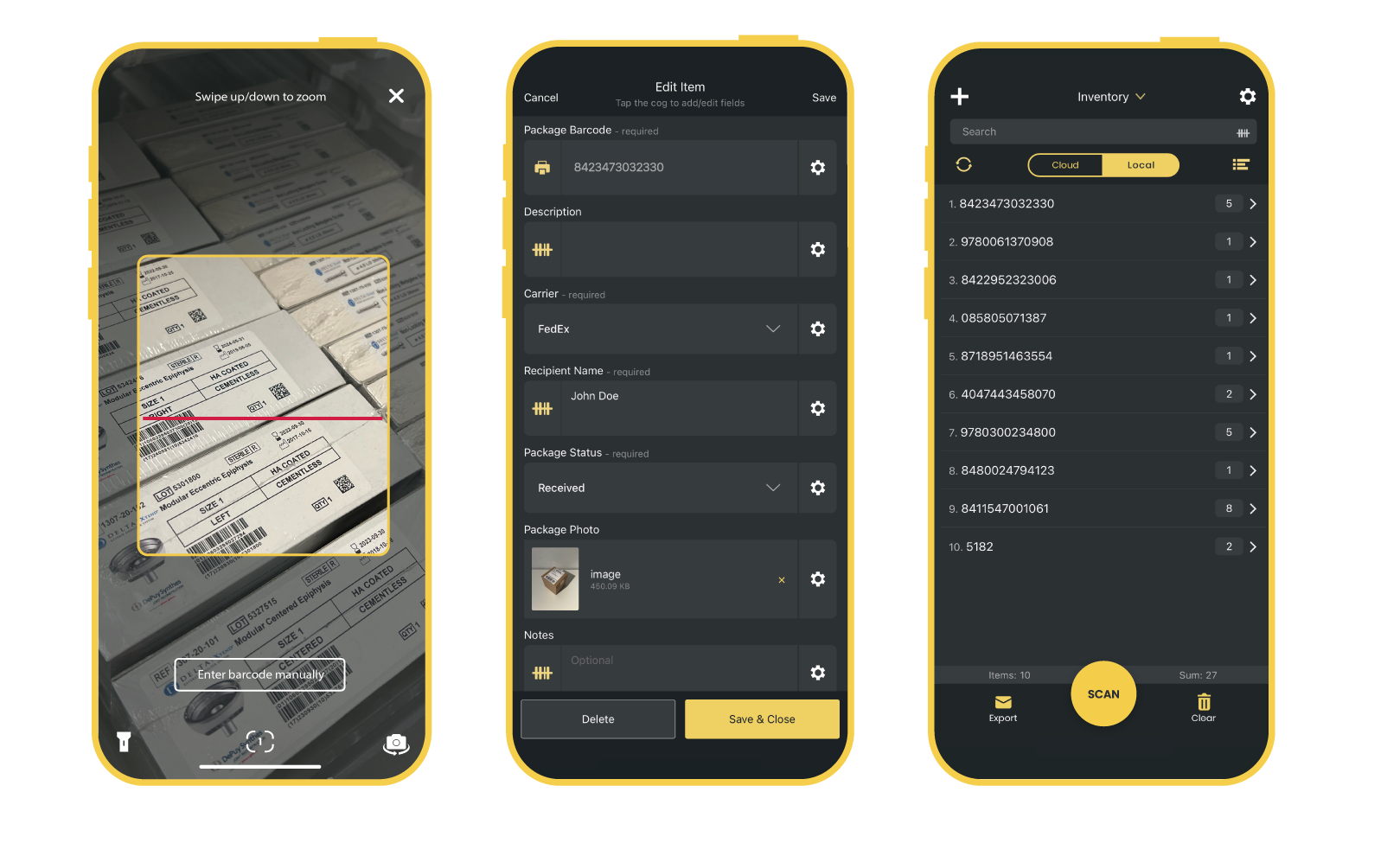
With our physical food items in front of us, all we had to do was open the app and scan each item's barcode once. Afterwards, we'd be left with a nice spreadsheet of UPC's and their quantities. And to get this to a normal spreadsheet (our choice was Google sheets), all we had to do was connect their OrcaScan account to their Google account. The only unfortunate part about this all was that, well, quality software usually costs money, and OrcaScan was no exception.
The free trial definitely showed us great potential, so we discussed with CK if they were willing to invest and also inquired with OrcaScan to see if a discount for non-profits would be possible. OrcaScan ended up being very receptive to their mission and kindly offered a free business plan account. Great! Now we had a way to go from the items to UPCs.
From here we imported the UPC's and quantities into Google Sheets. The next step was using the UPC's to find a name and price for each item. This is where Google Apps Script (GAS) came into play. GAS is a cloud-based scripting language to extend the functionality of normal G-Suite software, and in our case we needed to add the ability to make an API call to a UPC Lookup database to our Google Sheet.
The UPC Lookup database we decided to use was Upcitemdb because it offered a free plan of 100 lookups per day and the information was accurate to cross checks to amazon and Walmart. Although it wasn't a ton, it was the best option because other databases were charging at least $100/month for several thousand lookups per day, and that wasn't going to be worth it for CK. They were always available for donations, but typically only ran food-drive events about once every month or two. They might get a heavy load at those times, but since they have a pretty constrained list of acceptable items to stock in hospital pantries, the chances of going over 100 distinct items is pretty low. And in the off chance that they do go over 100 distinct items, they told us it would be completely fine to process them over a couple days if it meant keeping our solution free of cost.
Now for some slightly more technical details on how we Upcitemdb work out. What did the response look like, and how did you determine what price to attribute to each item? What if the API errored before giving a response? What if they didn't have that UPC listed in their database?
Upcitemdb returned a JSON response when making get requests to it. The fields of interest were .code to know if we got a good response or not and .items, which contained the rest of the information. Within .items, we wanted to know .items.title, a string of title of the product, and .items.offers, a list of the recorded offers on a product.
Whenever we got OK for a response, we would simply return a list with two items: response.items.title and avgPrice, which was the average of all costs in response.items.offers. We could do this nicely in one line with a reduce function, and the dividing by the length of the array.
Whenever we received errors, we would try again a maximum of three times. If either the API errored or we could not find the product, we just returned "API Error", or "Not Found", and the user would later just have to manually input it into the sheet. Luckily, this didn't happen often with their constrained list of items, so we were okay with this solution.
designing our Google Sheet
Spreadsheets can get confusing pretty quickly and we remembered that their previous solution wasn't super user friendly, so we wanted to make sure ours was straightforward. With this in mind, we designed our Google sheet with two main components: the Processor spreadsheet for processing a donation, and the rest of the sheets used for documentation.
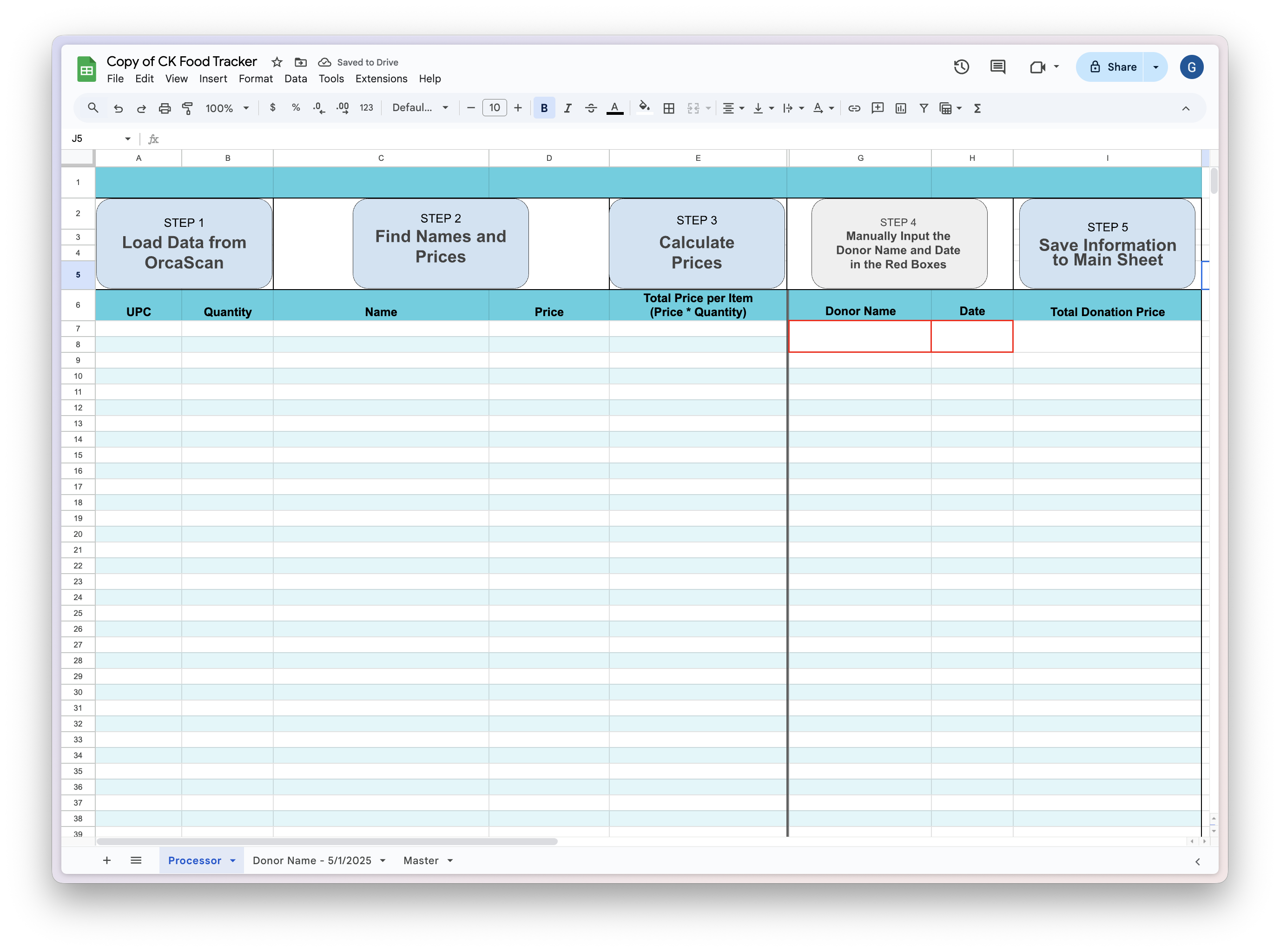
Pictured above is the Processor spreadsheet. Like outlined before, there are quite a few steps that have to happen in the background for the items to become a total donation estimate. We didn't want to give them a laundry list of instructions to follow (remembering their sad faces when talking about their previous solution), so we opted for some buttons that performed the macros in the background for them.
Once they scanned their items into the OrcaScan app, all they had to do was open this sheet, click each button across the top row, and then input the name and date into the red boxes.
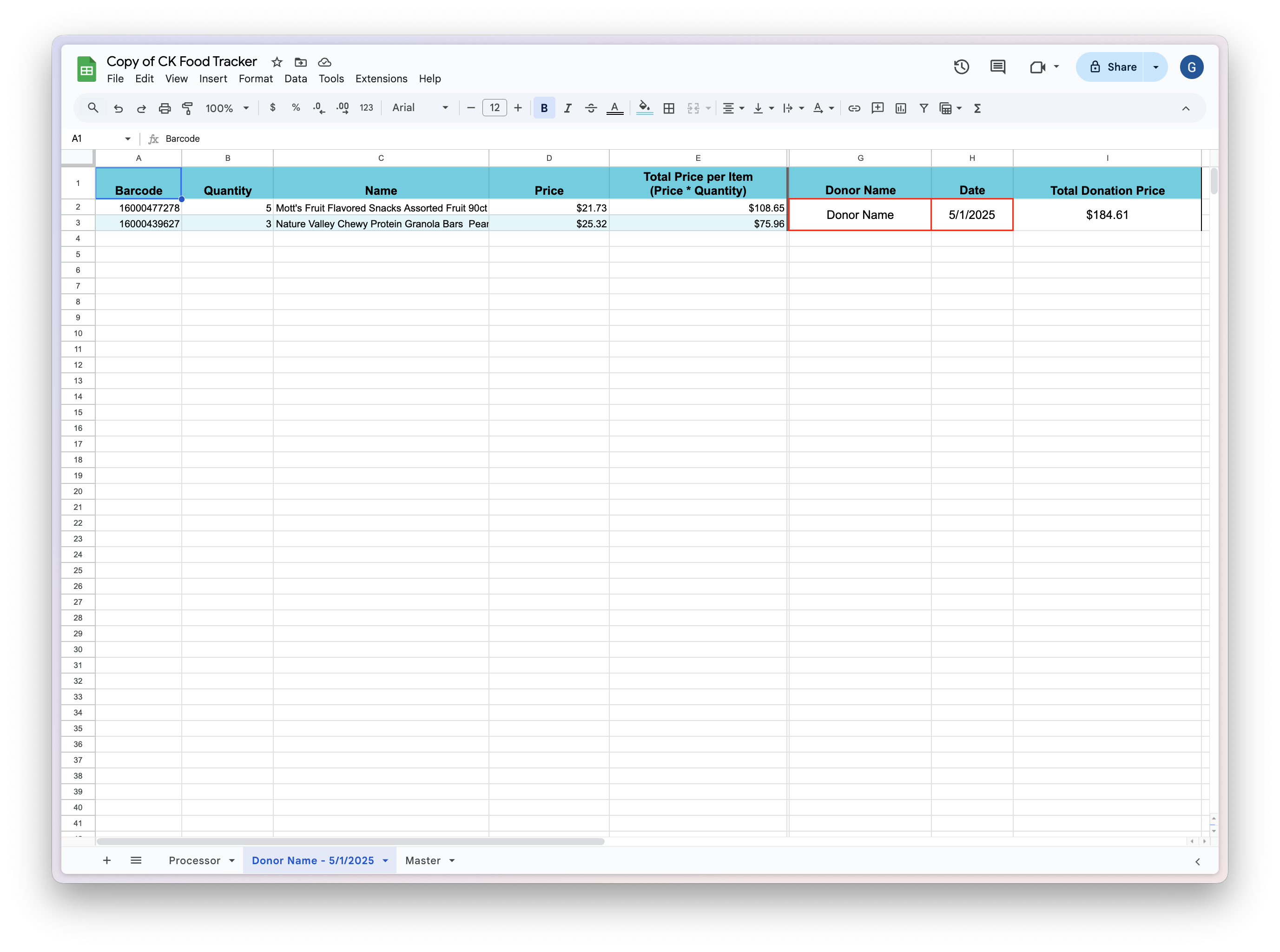
The Step 5 button would then clear the Processor sheet, save the donation details into it's own sheet titled by the Donor name and Donation date, and insert a link to it in the Master sheet. Pictured above is an example where the donation processed had two items.
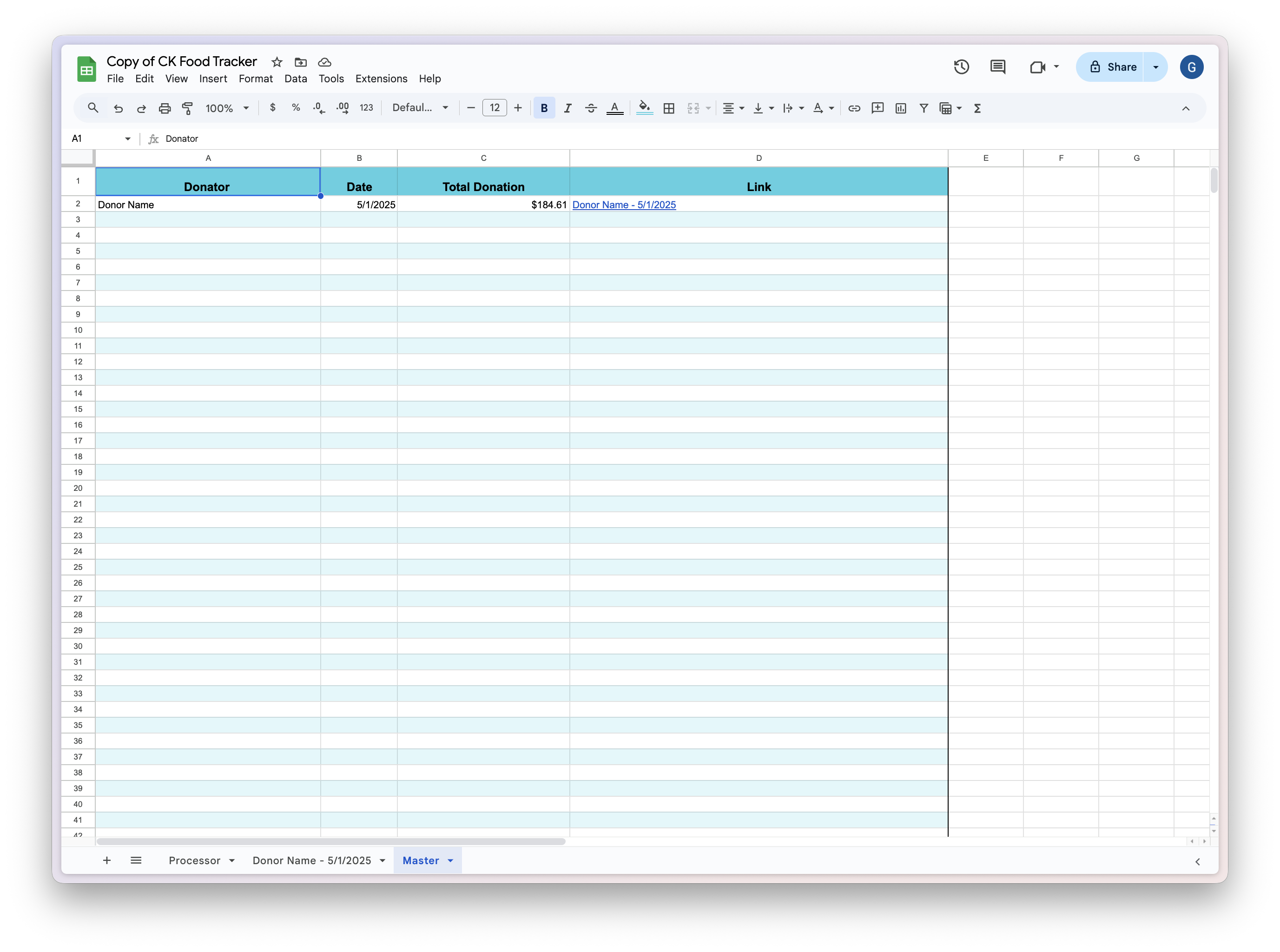
Lastly, we included a sheet to easily look for any of their previous donations. We dubbed it the Master sheet, and it contained an overview of all their tracked donations.
handing it off
At this point our workflow was pretty clear:
- Scan the items into OrcaScan.
- Open the Google sheet.
- Click the buttons for step 1 - 3.
- Input the donator name and the date.
- Click the Step 5 button.
- Done!
We spent a few sessions training them on how to use our new solution by walking through and explaining each step. They quickly caught on to how everything worked and were able to process sample donations much quicker than before, and with a lot less hassle. On donations where processing may take them a few hours before, now they could complete it in less than 30 minutes!
And it made sense looking at the before and after:
- Manually marking down items, then inputting them into a sheet -> scanning the item with OrcaScan
- Following long, confusing list of directions -> Press 4 buttons on a Google Sheet
Lastly, to make sure sure they had ample documentation for them to follow, we created written how-to guides and tutorial videos. These were to help in case they forgot how to do something, or wanted to onboard different volunteers to the product.
At the end of the semester, the IS program held a huge gathering for each client to present/celebrate their experiences with each team. We were super happy to receive great praise from CK, and were glad to have spent the semester together.
takeaways
In the end, I was was left pretty amazed at how a pretty low amount of technology was able to make such a big impact. I think that it can be really easy to take technical fluency for granted, and doing this project really put into perspective how small pieces of technology can make our lives so much easier.
On top of this, it was really rewarding to see the immediate impact from what we did. I feel like working in tech can sometimes be a little difficult because you're chasing those impact numbers, but often for random processes that are one step in a giant corporate machine. I don't want to discount achievements like improving the speed of API calls by x% or bringing down the CI/CD pipeline runtime from two days to one, but it is sometimes really exciting to see the exact problem you're solving with technology in real time and being one step away from your end user.
So to all the technologists out there that want to make the world a better place, maybe looking around at local non-profits could be a great place to start. Chances are they could use a little tech that isn't too hard for you to implement for them, and it could go a really long way for their mission.
Thanks for reading! - Gabe